Download Your Strategic Decision Tool
Choosing the right website platform is the most critical decision for your digital future. Stop guessing. Download our exclusive Platform Selection Self-Assessment Deck now.
The Strategic Platform Selection Assessment Deck
This comprehensive decision-making tool includes a custom scoring matrix and strategic checklist to help your team calculate the Optimal Platform Fit Score based on your specific business goals, technical capabilities, and budget.
In the current digital landscape, where AI overviews and Large Language Models (LLMs) are reshaping how content is discovered and consumed, the choice of a website development platform is more critical than ever for businesses worldwide. You understand that selecting the right platform isn’t just about managing content; it’s about crafting a resilient digital experience that performs flawlessly, resonates with your target audience, and ranks prominently in search results – including the increasingly important discipline of Answer Engine Optimization (AEO).
This definitive long-form guide examines the core strengths and limitations of the four leading website architectures: WordPress, Webflow, Framer, and Custom HTML. It provides the deep analysis required for complex decision-making, ensuring you select the optimal technology that drives long-term success and digital dominance in the AI-driven market.
The Strategic Foundations: Understanding the Four Platform Models
The foundation of a successful digital presence lies in choosing an architecture that aligns with your operational reality. Each platform represents a distinct philosophy regarding content scale, development budget, internal team capabilities, and long-term Total Cost of Ownership (TCO).
1.1. WordPress: The Content Powerhouse (Extensibility and Scale)
WordPress, the open-source Content Management System (CMS), remains the market giant, powering over 43.3% of all websites globally and dominating the CMS market share at 62.7%. Its enduring relevance is due to its unmatched extensibility.
- Core Philosophy: Prioritizes unlimited content scale, deep customization, and ease of use for content creators through its vast plugin ecosystem (over 59,000 plugins).
- Architectural Insight: Built on PHP and MySQL, WordPress offers complete control over content structure (custom post types, advanced taxonomies) and core functionality. This flexibility makes it ideal for complex applications like Learning Management Systems (LMS) and large-scale e-commerce, with WooCommerce alone holding 19% of the e-commerce market. While it offers maximum control, its reliance on multiple third-party components results in a Cost Volatility Model concerning security and maintenance.
1.2. Webflow: Visual Development Meets Managed Infrastructure (Design and Predictability)
Webflow is a leading visual development platform, designed to bridge the gap between design vision and clean, production-ready code. Its adoption is surging as up to 70% of new business applications leverage low-code/no-code technologies today, driven by the rise of the “citizen developer.”
- Core Philosophy: Empowers designers with visual control over HTML, CSS, and JavaScript, while providing enterprise-grade, managed infrastructure (hosting, security, CDN).
- Architectural Insight: As an all-in-one, managed solution, Webflow minimizes technical debt and operational risk. It excels for design-intensive, marketing-focused sites that prioritize visual quality and predictable performance. Webflow continues to integrate advanced AI features, including the reimagined AI Assistant and AI-powered SEO tools that help marketing teams draft schema markup and optimize metadata directly, streamlining the complex AEO process.
1.3. Framer: The Designer’s Accelerator (Speed and Impact)
Framer has dramatically accelerated, transitioning from a prototyping tool to a robust, design-first website builder focused on velocity. It has experienced a 400% increase in user adoption recently, signaling its market momentum for agile projects.
- Core Philosophy: Unmatched speed-to-market, rapid iteration, and high visual fidelity, often leveraging a Figma-like design interface.
- Architectural Insight: Delivers static, lightweight code via an edge CDN, resulting in fast load times (up to 35% faster than baseline WordPress). This performance edge is ideal for securing quick AEO wins. Framer is the premier choice for short-cycle marketing campaigns, interactive prototypes, and landing pages that need immediate visual impact, though its CMS capabilities are basic by design.
1.4. Custom HTML: Absolute Control and Performance (Unique Requirements)
Custom HTML refers to sites built manually from the ground up using core web languages (HTML, CSS, JavaScript) without relying on a large third-party platform. This architecture is reserved for projects where platform constraints are unacceptable.
- Core Philosophy: Maximum control, unparalleled performance, and the freedom to build proprietary application logic tailored to unique business needs.
- Architectural Insight: The leanest possible codebase, free of platform “bloat.” Offers the highest potential for performance optimization (up to 45% faster than baseline WordPress) and the most granular control over AEO implementation, but demands the highest level of technical expertise and maintenance commitment.
Ranking in the AI Era: SEO, AEO, GEO, and Performance
Digital visibility today hinges on how well your content is structured for both human users and non-human processors like LLMs. This requires mastering Generative Engine Optimization (GEO), the strategic discipline of ensuring AI engines (like Google’s AI Overviews) accurately recognize, integrate, and cite your content in their responses.
2.1. What is Answer Engine Optimization (AEO) and its Technical Mandate?
Answer Engine Optimization (AEO) is the critical marketing strategy focused on preparing content to be cited in AI-generated responses, a necessary step since over 58% of consumers rely on AI-powered search tools for information discovery.
- Content Strategy: To be selected for an AI Overview, content must be structured with explicit questions in headings (H2/H3) followed immediately by concise, direct answers (optimally 40-60 words). This conversational Q&A format is essential for LLM ingestion.
- Technical Mandate: Structured Data is non-negotiable. Google highly recommends using JSON-LD format for Schema.org markup (specifically FAQPage and Article schema) to explicitly define content relationships for AI ingestion, a practice critical for earning rich snippets and citations.
- Authority (E-E-A-T): LLMs and search engines prioritize content that adheres to Google’s E-E-A-T guidelines (Experience, Expertise, Authoritativeness, Trustworthiness), ensuring content is factual, well-sourced, and transparent.
2.2. Core Web Vitals (CWV) and Speed Benchmarks
Site speed directly affects user experience and is a critical signal for AEO, as fast sites are crawled more efficiently. Core Web Vitals metrics, including Interaction to Next Paint (INP) ($le 200text{ms}$) and Largest Contentful Paint (LCP) ($le 2.5text{s}$), dictate performance standards today. The platform architecture fundamentally dictates the ease of meeting these benchmarks.
| Platform | Relative Performance Speed | CWV Optimization Profile | Infrastructure Strategy |
|---|---|---|---|
| Custom HTML | 45% faster than WordPress baseline | Maximum optimization potential, but implementation is fully manual. | Bespoke architecture for optimal speed. |
| Framer | 35% faster than WordPress baseline | Highly optimized static delivery via Edge CDN, excellent for fast frontends. | Managed platform, speed prioritized over data complexity. |
| Webflow | 20% faster than WordPress baseline | Strong managed performance via enterprise hosting and dual CDN stack. | Predictable performance is a core subscription feature. |
| WordPress | Baseline (Variable) | Performance is an ongoing maintenance cost; relies on plugins and hosting quality. | Self-hosted control, requires continuous active management. |
2.3. Platform Readiness: AI Tools and AEO Control
The ease of implementing AEO and leveraging AI tools varies significantly by platform, directly impacting marketing team efficiency and time-to-market.
| Platform | Primary AEO Advantage | AI Features (Current) | Structured Data Control |
|---|---|---|---|
| WordPress | Extensive plugin ecosystem (Yoast, Schema Pro) for deepest AEO customization | AI tools integrated into builders (Elementor AI) and SEO plugins (AIOSEO AI) | Complete, granular control via plugins |
| Webflow | Managed clean code and new AI-powered SEO tools | Reimagined AI Assistant, AI Code Gen, AI drafting of metadata/schema | Good native support; AI drafting lowers implementation barrier |
| Framer | Unmatched speed and lightweight code, favoring rapid crawling | Wireframer (prototyping), AI Translate (full site localization) | Basic native support; recent updates improve JSON-LD implementation |
| Custom HTML | Unlimited potential for performance optimization and custom schema | None built-in; custom integration required | Absolute control, 100% manual implementation required |
Financial & Operational Assessment: TCO and Risk
When comparing website platform costs, it is essential to look beyond the monthly fee and calculate the Total Cost of Ownership (TCO), which includes labor hours, security liability, and developer dependency.
| Cost Category / Platform | WordPress | Webflow | Framer | Custom HTML |
|---|---|---|---|---|
| Initial Development Cost | Variable (Project-based) | Moderate ($500 – $5,000+) | Low ($0 – $1,500) | Highest ($3,000 – $70,000+) |
| Base Monthly | Variable | $approx | $approx | $approx / $5 – |
| Subscription | (Hosting Only) | $39/text(mo) (Business Plan) | $30/text(mo) (Pro Plan) | $100/text(mo) (Hosting Only) |
| Annual Plugin/Feature Cost | High (Up to $1,000+/text/yr for premium features) | Low (Features mostly built-in) | Low (Features mostly built-in) | N/A (Requires custom code) |
| Maintenance Overhead | High (Updates, Security Patches, Plugin Conflicts) | Low (Managed Hosting & Security) | Low (Managed Hosting) | Very High (Dedicated Developer Required for all updates) |
| Security Posture | Highest Risk (Due to 59k+ plugins/open source) | Strong Managed Security (DDoS, auto-updates) | Strong Managed Security (Simplified architecture) | Dependent on the quality of the developer |
Critical Platform Limitations
- WordPress: The open-source model carries a higher inherent security risk, requiring constant, costly maintenance and monitoring to mitigate vulnerabilities. This operational burden often makes the TCO volatile.
- Webflow: CMS item limits (10,000 max on the standard Business plan) make it structurally unsuitable for massive, ever-growing content libraries, such as news organizations or large documentation sites. This is a fundamental scalability constraint.
- Framer: Basic CMS capabilities (limited content structuring options) and lack of robust e-commerce features limit its suitability for content-heavy or transactional sites. For many users, the need for a basic blog and a portfolio requires upgrading to the expensive Pro plan.
- Custom HTML: Requires a full development team and high initial investment; maintenance is 100% manual.
Strategic Recommendations: Which Platform is Right for Your Business?
The ultimate platform choice is driven by matching business objectives to platform capabilities. Use this strategic matrix to quickly compare and contrast the trade-offs involved in your decision.
| Factor / Platform | WordPress | Webflow | Framer | Custom HTML |
|---|---|---|---|---|
| Best Fit Project Types | Content-heavy blogs, e-commerce (WooCommerce), complex web apps, enterprise sites | Design-intensive marketing sites, brand portfolios, mid-scale content, lead generation | High-impact landing pages, rapid campaign sites, interactive prototypes/MVPs | Unique enterprise applications, mission-critical performance, proprietary functionality |
| Key Business Profile | Prioritizes content scale, deep customization, and functional flexibility | Prioritizes design quality, predictable costs, and streamlined workflow for marketing teams | Prioritizes speed-to-market, visual impact, and low budget entry for campaigns | Prioritizes maximum control, speed, unique functionality, and has internal developers |
| Content Scalability | Unlimited content, taxonomies, and user roles (Requires optimization) | Limited by CMS item count (10K max on Business plan) | Limited CMS (Basic content, insufficient for large blogs or documentation) | Unlimited (Requires custom CMS development) |
| Time-to-Launch | Weeks to Months (due to customization/testing) | Days to Weeks (faster than custom coding) | Hours to Days (Unmatched velocity) | Months to Years (High development complexity) |
Final Platform Selection Guidance
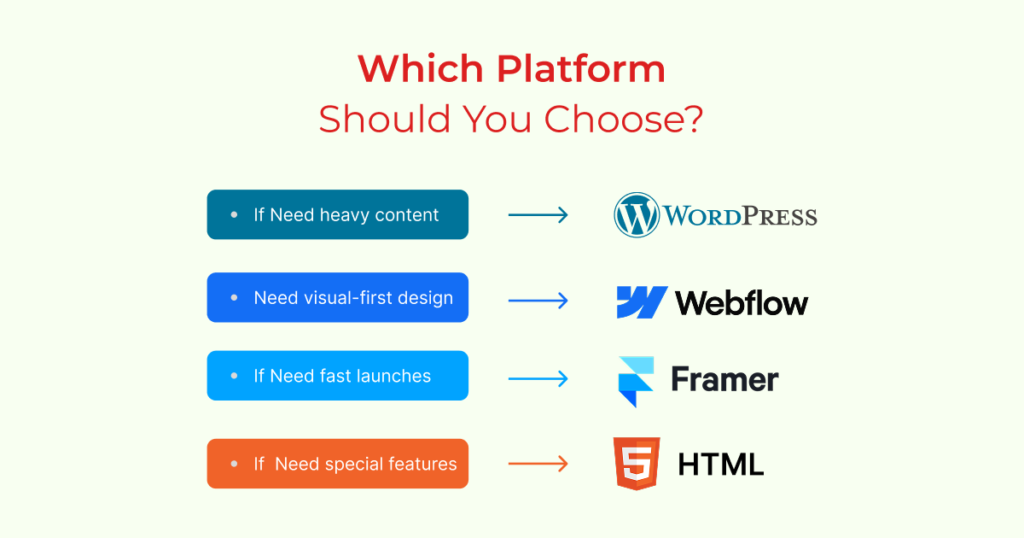
- Choose WordPress When: Your primary focus is on content volume, complex functionality (LMS, forums), and deep, granular SEO/AEO customization, provided you have the resources to manage the higher security and maintenance overhead.
- Choose Webflow When: Design excellence, brand consistency, and predictable, managed infrastructure are paramount. This is the optimal choice for marketing teams seeking visual autonomy without the risks of self-hosting.
- Choose Framer When: Speed, visual impact, and rapid, agile deployment cycles for specific campaigns or MVPs are your highest priorities. It delivers quick AEO wins on targeted content.
- Choose Custom HTML When: Your technical requirements are proprietary, performance must be absolutely maximized, and your internal development team is prepared for high upfront costs and perpetual manual maintenance.
Final Step: Download Your Strategic Assessment
The optimal platform decision hinges on a systematic evaluation of your unique needs. We encourage you to move from comparison to decision with our specialized self-assessment tool.
Take the next step in your digital journey. Download the full Website CMS Platform Selection Assessment Deck now.
This executive tool includes a customizable priority scoring matrix and a strategic decision formula to help you calculate the Optimal Platform Fit Score, ensuring alignment with your business goals, technical capabilities, and long-term AI-era growth strategy.