Table of Contents
- Why Generic B2B Websites Lose Enterprise Deals (And What Personalization Fixes)
- How HubSpot Website Personalization Works for Account-Based Marketing
- The Highest-Impact HubSpot Personalization Starting Point
- Stage-Aware Dynamic Content in HubSpot: Same Page, Different Experience by Buying Stage
- The Account Signal Ladder: How The Smarketers Implements HubSpot Website Personalization
- When HubSpot Website Personalization Is Not the Right Move
- Where to Start
- Frequently Asked Questions
Need help with B2B Marketing?
Let the smarketers’ team drive your pipeline with data-led campaigns and AI-powered growth strategies.
A VP of operations from one of your top 50 target accounts lands on your homepage on a Tuesday afternoon. She sees the same hero message, the same case study carousel, and the same generic demo CTA as a student researching a term paper. Ninety seconds later she is gone, and your ABM dashboard never registers that the visit happened.
This is the standard experience on most enterprise B2B websites, and the numbers explain the cost. According to 6sense’s Buyer Experience Report, up to 90% of identifiable account visitors remain anonymous through the journey, and only about 3% of web visitors ever convert on a form. Meanwhile 70 to 80% of the buyer journey happens before first vendor contact, which means your website is doing most of the selling long before a rep gets a chance to.
If you run ABM, this creates an uncomfortable contradiction. Your Account-Based Marketing ads, emails, and SDR sequences are built account by account, then every account arrives at a website that treats them identically. This article covers how to close that gap with HubSpot website personalization: what to personalize, how to build industry pages and stage-aware dynamic content, and the implementation sequence we use at The Smarketers, including where personalization is not worth the effort.
Why Generic B2B Websites Lose Enterprise Deals (And What Personalization Fixes)
Generic websites lose enterprise deals because the buying process has moved onto your site while your site still behaves like a brochure. Gartner’s March 2026 sales survey found that 67% of B2B buyers prefer a rep-free buying experience. The committee doing that rep-free research is not small either: Forrester and 6sense put the median B2B buying group at 11.2 people for deals over $50K. Eleven people, each with different questions, all landing on one page written for nobody in particular.
The outcome shows up in conversion data. First Page Sage benchmarks put the average B2B website conversion rate around 1.8%, with 3% considered good and 5%+ strong for higher-ACV companies (ACV means annual contract value, the yearly revenue a customer contract produces). A site converting under 2% of visitors is not a traffic problem. It is a relevance problem: the page cannot answer the specific question the specific visitor brought to it.
There is a deadline attached to fixing this. 6sense also found that roughly 95% of the time, the winning vendor was already on the buyer’s day-one shortlist. The anonymous visits your site receives during early research are shortlist-forming visits. If a manufacturing operations lead cannot quickly find manufacturing proof, manufacturing language, and a manufacturing-relevant next step, the shortlist forms without you, and no amount of later sales effort reliably reverses that.

Key stat: Up to 90% of identifiable account visitors remain anonymous through the journey, and about 95% of the time the winning vendor was already on the day-one shortlist. Your generic homepage is auditioning for shortlists it does not know are forming. (Source: 6sense Buyer Experience Report 2025.)
How HubSpot Website Personalization Works for Account-Based Marketing
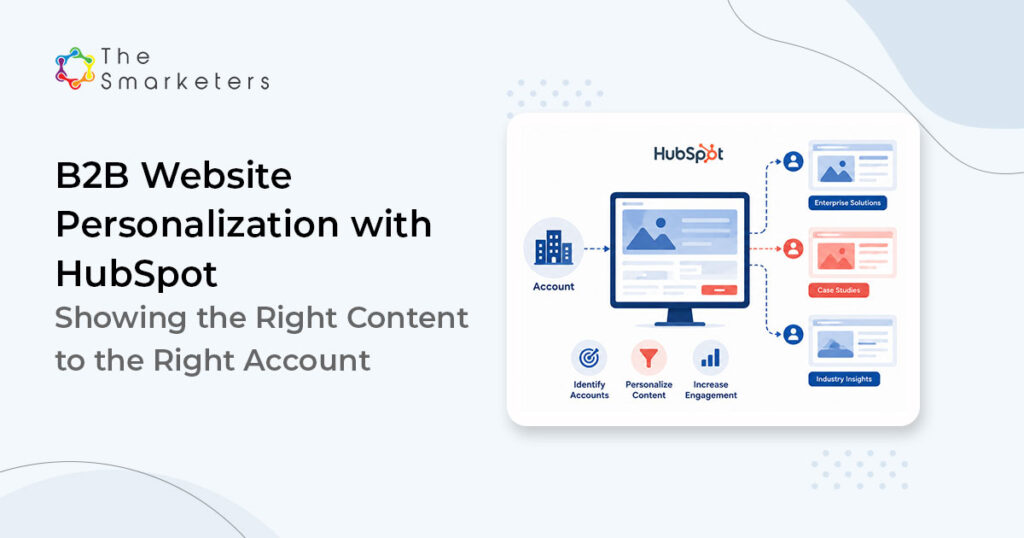
Account-based website personalization means changing what a page shows based on which account, industry, or buying stage the visitor belongs to, rather than showing one static version to everyone. In HubSpot, that capability is native: smart content rules, personalization tokens, dynamic CTAs, and CRM-driven lists let the same URL render differently for a target account in pharma than for an unknown visitor. This matters practically because HubSpot is already the system of record for a large share of B2B marketing teams: the platform ended 2025 with about 288,700 customers and holds roughly 38% of the marketing automation market. If your ABM data lives in HubSpot, your personalization logic can live there too, with no extra tool to buy or integrate.
Four HubSpot website personalization mechanisms do most of the work, anchored by HubSpot smart content rules that swap entire page sections by audience segment and they solve different problems:
| Mechanism | What it does | Best for | Watch out for |
|---|---|---|---|
| Smart content | Swaps sections of a page by list membership, lifecycle stage, country, or device. | Hero messages, proof sections, and offers for named account tiers or industries. | Rule sprawl; keep 3 to 5 variants per module, not 20. |
| Personalization tokens | Inserts CRM properties (name, company, industry) into copy. | Known contacts in nurture flows and follow-up pages. | Looks broken when data is missing; always set defaults. |
| Dynamic CTAs | Shows a different call to action by stage or segment. | Moving one URL from "learn" to "compare" to "talk to us". | A decision-stage CTA shown too early reads as pushy. |
| Dedicated ABM pages | Separate landing pages per industry or per account tier, fed by campaign URLs. | Tier-1 accounts and industry campaigns where depth beats automation. | Maintenance cost; only build what you will keep current. |
The prerequisite for all of it is identification. Personalization rules need a signal to fire on: a target-account list synced from your CRM, first-party form and email data, reverse-IP identification for company-level matching (reverse-IP means inferring the visiting company from its network address), or campaign parameters on inbound ad traffic from your ABM plays. None of these identifies everyone. Together they usually identify enough of your named-account traffic to make personalization meaningful, and the ABM investment is what pays for the plumbing: 87% of marketers say ABM delivers higher ROI than other strategies, and companies using ABM report a 48% increase in revenue per account.. A personalized website is one of the few ABM assets that works on every account in the program at once.
The Highest-Impact HubSpot Personalization Starting Point
If you build only one personalized asset this quarter, build industry landing pages. They outperform generic pages for a simple reason: an operations director in medical devices and a CTO at a logistics SaaS company do not share pains, proof requirements, or vocabulary, and one page cannot speak to both. An industry page can mirror the visitor’s regulatory reality, name their systems, and show a case study from their world.
A pattern that has held across our client work: the industry page does not need to be long, it needs to be specific. Five components carry the weight:
- An industry-native headline. Written in the buyer’s language, not yours. “Reduce unplanned downtime across plant networks” beats “Solutions for manufacturing.”
- The three pains that industry actually ranks first. Pulled from sales call notes and closed-lost reasons, not from a persona workshop.
- Industry-matched proof. One relevant case study with numbers beats six logos from other sectors.
- An offer calibrated to the industry’s buying stage. Regulated industries often want an evidence pack; SaaS buyers often want the pricing conversation sooner.
- Schema and internal links. So the page earns organic and AI-search visibility for industry-modified queries, and routes visitors deeper.
Two technical notes. First, keep these pages fast: speed studies compiled by Lucky Orange show a 1-second delay in load time can cut conversions by about 7%, and personalization scripts are a common cause of exactly that delay. Second, design for the desk: benchmark data shows desktop converting around 4.8% versus about 2.9% on mobile in B2B, but committee members still skim on phones between meetings, so the page has to survive both.
Gated this way, conversion quality changes character. A form in front of an eval kit is not friction; it is a fair trade the engineer understands. Progressive profiling keeps the first ask small (name, company, application), and the application field, one honest dropdown, is worth more to sales than ten firmographic fields, because it tells them which socket the request is about.
Smarketers insight: Route ABM ad traffic to industry pages with campaign parameters instead of relying only on reverse-IP identification. The ad click tells you the industry with certainty; IP matching only guesses. We typically see the parameter-routed version outperform because the page fires the right variant every time.
Stage-Aware Dynamic Content in HubSpot: Same Page, Different Experience by Buying Stage
Stage-aware dynamic content changes the offer, not the facts. A visitor researching the category for the first time and a buying committee member doing final diligence can hit the same URL, and HubSpot smart rules can hand each a different next step. This matters because the rep-free majority will not call your sales team to say which stage they are in; the website has to infer it from lifecycle stage, deal stage on the associated account, page-view behavior, or list membership.
A working model we implement for clients maps three stages to three swaps:
| Buying stage (signal in HubSpot) | What to swap in | CTA that fits |
|---|---|---|
| Research (unknown or subscriber; first sessions; blog entry pages) | Educational framing, category explainers, benchmark content. | Guide or benchmark download, newsletter. |
| Evaluation (MQL/SQL; repeat visits to product and pricing pages) | Comparison tables, integration details, security and compliance proof. | Webinar, assessment, ROI calculator. |
| Decision (open deal on account; committee visits from one company) | Case studies with numbers, implementation plan, onboarding timeline. | Tailored demo, proposal review, reference call. |
The evaluation row deserves the most care, because that is where AI-assisted research now sits. Gartner’s survey of 645 B2B buyers found 45% used generative AI to gather vendor and product information, and buyers consulted around seven information sources per purchase. Your evaluation-stage content is competing with, and feeding, machine-generated summaries. Answer-first sections, comparison tables, and explicit specifications serve both the human evaluator and the AI assistant summarizing your page to the rest of the committee.
One discipline rule keeps the whole system trustworthy: personalize the pitch, never the substance. Pricing logic, product claims, and specifications must stay consistent across variants. Committee members compare notes, and a site that appears to say different things to different people costs you the credibility that personalization was supposed to build.
The Account Signal Ladder: How The Smarketers Implements HubSpot Website Personalization
We implement HubSpot website personalization through a five-rung sequence we call the Account Signal Ladder. The order is the point: each rung earns the data the next one depends on, and teams that jump straight to rung four ship personalization that fires on guesses. As an AI-enabled HubSpot Platinum Solutions Partner, we run this inside the client’s existing portal rather than adding another tool, and the web experiences it produces have been recognized with a Web Excellence Award in 2025.
- Identify. Sync the target-account list into HubSpot, connect CRM and form data, and layer reverse-IP matching. Goal: know which named accounts are actually on the site this week.
- Prioritize. Score accounts on fit and engagement so effort follows pipeline value. Tier 1 gets dedicated pages; tier 3 gets smart-content variants. Personalizing equally for every account is how programs burn out.
- Map. For each priority industry and stage, decide what the visitor must see within ten seconds: the pain named, the proof shown, the next step offered. This is a content exercise, not a technical one, and it is where most of the thinking lives.
- Personalize. Build the smart rules, tokens, dynamic CTAs, and industry pages in HubSpot, with defaults that make the site fully coherent for unknown visitors. Ship a few high-traffic modules first, not a whole-site rebuild.
- Measure. Report at the account level: target-account sessions, engaged accounts, page-to-meeting conversion, influenced pipeline. Visitor-level averages hide exactly the signal ABM needs.

What this looked like for a SaaS client
Sentient, a SaaS client, came to us with steady traffic and flat conversions: the classic symptom of a site speaking to everyone and persuading no one. We rebuilt the highest-intent pages around specific audience segments and stage-aware offers, tightened the identification layer, and moved reporting to segment level. Over the engagement, traffic grew 5X and conversions grew 7X (Smarketers client engagement). Conversions outgrowing traffic is the signature of relevance work: the site did not just attract more visitors, it started answering the ones it already had.

Key takeaway: Personalization did not create Sentient’s demand. It stopped wasting the demand that already existed. If your traffic is growing but conversions are flat, relevance, not reach, is the constraint to attack first.
When HubSpot Website Personalization Is Not the Right Move
Account-based personalization is a multiplier on an already-clear B2B website, not a rescue for a confused one. Skip or defer it in four situations:
- Your baseline pages underperform for everyone. If the generic site converts well under the 1.8% benchmark, fix the message, proof, and offer first. Personalizing a weak page produces five weak variants.
- Your CRM data cannot support the rules. Wrong industry values and stale lifecycle stages make personalization actively worse than a generic page, because the visitor sees content for somebody else. Clean the properties before you branch on them.
- Your target-account traffic is too thin to matter. If named accounts produce a handful of sessions a month, invest in the demand and ABM programs that create those visits before optimizing their experience.
- You cannot maintain the variants. Every variant is a page someone must keep accurate. A stale personalized page, quoting last year’s product line to your best account, is worse than an accurate generic one.
There is also a privacy boundary. Company-level personalization (“content relevant to manufacturing”) reads as helpful. Person-level flourishes for someone who never identified themselves read as surveillance. Stay on the helpful side, respect consent settings, and disclose identification practices in your privacy policy.
Where to Start
Pull two numbers this week: what share of your target accounts visited the site last quarter, and what your highest-traffic pages convert for those accounts. If identification is dark and conversion is generic-flat, you have found a budget hiding in your own traffic. Model what a conversion lift is worth with our ABM ROI calculator, then, if you want the Account Signal Ladder mapped to your portal, industries, and account tiers, get a personalization strategy from our HubSpot team. It is the same working session we start every implementation with, and you keep the map either way.
Frequently Asked Questions
Which HubSpot subscription tier do we need for website personalization?
Smart content and dynamic CTAs require Marketing Hub Professional or Enterprise; Enterprise adds partitioning and more advanced targeting useful for larger ABM programs. If you already run ABM lists and workflows in HubSpot, Professional is usually enough to start.
How long does an account-based personalization rollout take?
A focused first release, identification layer plus two or three industry pages and smart-content modules on high-traffic pages, typically takes 4 to 8 weeks. Whole-site personalization is a quarter-plus effort and rarely the right first move.
How much target-account traffic do we need before this pays off?
As a working floor, a few hundred sessions per month from named or identifiable accounts. Below that, the same budget usually returns more when spent creating account traffic through ABM and demand programs than optimizing the experience of the few visits you get.
Do we need a third-party ABM platform on top of HubSpot?
Not to start. HubSpot covers lists, smart content, CTAs, and account-level reporting natively. Dedicated ABM platforms add stronger anonymous-account identification and intent data, which matters once tier-1 coverage in HubSpot proves the model and you want more of your anonymous traffic resolved.
How do we measure whether personalization is working?
Compare personalized against default experiences on the same URLs: engaged-account rate, conversion to meeting, and influenced pipeline for target accounts. Run the comparison at the account level over at least a quarter; visitor-level averages will understate the effect.
Will personalized pages hurt our SEO?
Not if the default variant is a complete, indexable page. Search engines see the default; personalization layers on top for identified segments. Keep one canonical URL per page, avoid cloaking (showing crawlers substantively different content than users), and keep scripts fast so Core Web Vitals do not degrade.
What data do we need in order, before writing any smart rules?
Three properties must be trustworthy: industry on the company record, lifecycle or deal stage, and target-account tier. If any of the three is unreliable, fix it first; every rule you write will branch on them.
Is IP-based company identification compliant with privacy regulations?
Company-level identification is generally lower risk than person-level tracking, but it still belongs in your privacy disclosures, and consent rules vary by jurisdiction. Honor cookie consent for behavioral rules, avoid person-level inference for anonymous visitors, and have counsel review the identification stack before launch.

Venugopal Mamidala
Director of MarTech