Table of Contents
- Why Manufacturers Struggle with CRM Adoption
- The Ideal HubSpot Architecture for Industrial Sales
- Automating Distributor and OEM Communications
- Integrating ERP Data with HubSpot
- The Smarketers Implementation Approach: A Fortune 500 Case
- Common Mistakes That Sink Manufacturing HubSpot Rollouts
- Where to Start
- Frequently Asked Questions
Need help with B2B Marketing?
Let the smarketers’ team drive your pipeline with data-led campaigns and AI-powered growth strategies.
A manufacturer buys a CRM, runs the training sessions, and six months later the sales team is back in spreadsheets. Quotes live in email threads. Distributor activity is invisible. The plant knows more about order status than the account manager does. The license renewal comes up and someone asks, reasonably, what the company actually got for the money.
If that sounds familiar, the problem is almost never the software. It is the architecture: a CRM configured for a simple, direct, one-buyer sales motion, dropped into a business that sells through distributors, OEMs, and buying committees, on cycles measured in quarters. Forrester and 6sense research puts the median B2B buying group at 11.2 people for deals over $50K, and industrial deals sit firmly in that territory. A contact database with a single pipeline cannot describe that reality, so reps stop using it.
This article lays out how we structure HubSpot for manufacturing companies at The Smarketers: the object model, the pipeline design, the distributor and OEM automation, the ERP integration, and the results a Fortune 500 industrial automation client saw within four weeks of the rebuild. It is written for teams evaluating HubSpot as well as teams re-implementing it after a stalled first attempt.
Why Manufacturers Struggle with CRM Adoption
Manufacturers struggle with CRM adoption because standard CRM assumptions do not match industrial selling. Most CRMs assume one seller, one buyer, one pipeline, and a deal that closes in weeks. Industrial sales run through channel partners, multi-year OEM relationships, engineered-to-order quotes, and buying groups where procurement, engineering, and operations all hold veto power.
The buying behavior has also moved further from the sales team than most industrial leaders assume. Forrester research consistently finds that 70 to 80 percent of the buyer journey happens before first vendor contact, and Gartner reported in March 2026 that 67% of B2B buyers prefer a rep-free buying experience. For a manufacturer, that means spec sheets, configurators, and distributor portals are doing sales work long before a rep knows the account exists. A CRM that only records rep activity misses most of the actual buying process.
There is also a data problem underneath the adoption problem. 6sense measurement shows up to 90% of identifiable account visitors stay anonymous through the journey, and only about 3% of web visitors ever fill a form. If your CRM is populated purely by inbound form-fills, it will always look empty to a sales team that knows more accounts are in motion than the system shows. Empty systems do not get used.
The platform choice itself matters less than the build, but it is not irrelevant. HubSpot now holds roughly 38% of the marketing automation market, and while Salesforce still leads CRM share at about 20.7% per IDC, HubSpot is the fastest-growing major CRM by customer count, with particular strength in the mid-market where most manufacturers operate. The company ended 2025 with roughly 288,700 customers and $3.13B in revenue, up 19% year over year. For industrial firms, the practical argument is unified data: marketing, sales, and service records in one object model, which is precisely what the distributor and ERP work below depends on.

The Ideal HubSpot Architecture for Industrial Sales
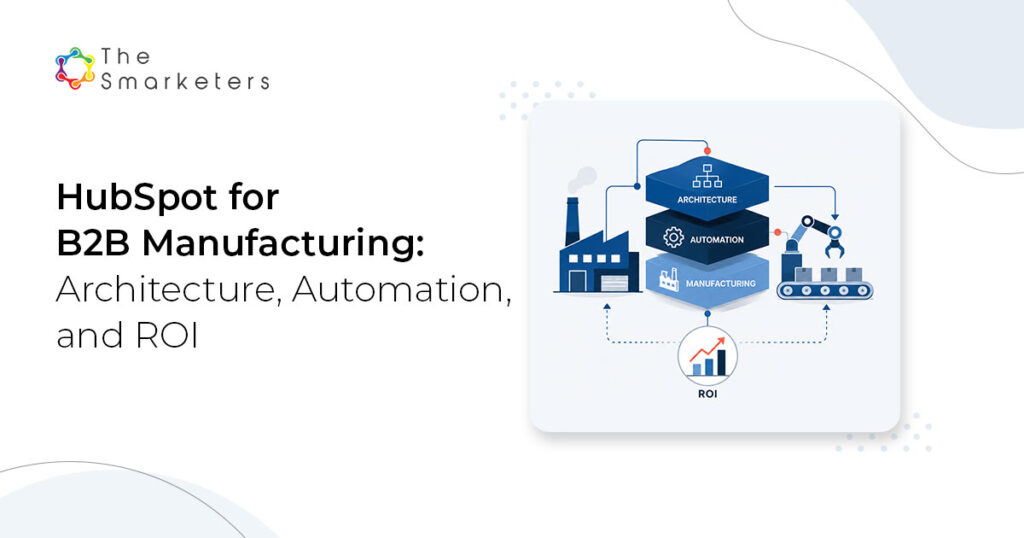
The ideal HubSpot architecture for manufacturing models your commercial reality in four layers: custom objects for the entities that matter (plants, distributors, OEM programs), separate pipelines per sales motion, association labels that capture buying-group roles, and reporting built on revenue rather than activity. We call this build the Industrial Revenue Architecture, and we implement it in five steps.
- Model the real sales objects. Before configuring anything, map the entities your revenue actually flows through: end customers, distributors, OEM partners, plants or sites, and service contracts. In HubSpot this becomes companies with parent-child structures, custom objects for distributor agreements or installed equipment, and association labels such as “specifier,” “procurement,” and “end user” on contacts. This step decides whether the CRM describes your business or a generic one.
- Build pipelines per motion. Direct enterprise sales, distributor-led sales, and aftermarket or parts revenue are different motions with different stages, cycle lengths, and exit criteria. Give each its own pipeline with defined entry criteria. One blended pipeline produces meaningless weighted forecasts that make manufacturing leadership distrust CRM data.
- Automate channel communications. Distributor onboarding sequences, quote follow-up workflows, re-order reminders based on typical consumption cycles, and OEM program updates. This is covered in depth in the next section; architecturally, it requires the distributor to exist as a first-class object, which is why step one matters.
- Connect ERP data. Order history, credit status, and shipment data sync into HubSpot so commercial teams see revenue reality next to pipeline records. Covered two sections down.
- Report on revenue, not activity. Dashboards that tie campaigns, reps, and distributors to closed orders per account. Manufacturing CFOs do not care about email open rates; they care about which accounts grew. Build the reporting they will actually read.

A concrete way to see the difference is to compare the default configuration most manufacturers inherit with the industrial build:
| Layer | Default HubSpot setup | Industrial Revenue Architecture |
|---|---|---|
| Objects | Contacts and companies only | Parent-child companies, custom objects for distributors, OEM programs, and installed base |
| Pipelines | One pipeline, generic stages | Separate pipelines for direct, distributor, and aftermarket motions with entry criteria |
| Buying group | One "decision maker" contact field | Association labels for specifier, procurement, engineering, and end user |
| Automation | Generic lead nurture emails | Distributor onboarding, quote follow-up, re-order triggers, OEM program updates |
| Reporting | Activity dashboards (calls, emails) | Revenue per account, pipeline velocity per motion, distributor performance |
One honest caveat before the automation section: if your commercial team is under five people and you sell one product line directly, most of this architecture is overhead you do not need. A simple pipeline and disciplined follow-up will outperform an elaborate build nobody maintains. The architecture below earns its complexity when channel partners, buying groups, and ERP data enter the picture.
Automating Distributor and OEM Communications
The highest-return automation for manufacturers is channel communication, because it is high-volume, repetitive, and currently handled by memory. A distributor rep who does not hear back about a quote within two days moves to the next principal on the line card. Automation makes your company the easiest principal to work with, which is a durable advantage that has nothing to do with price.
Four workflow families do most of the work:
- Distributor onboarding: a sequence that delivers pricing access, product training, co-op marketing assets, and a named contact over the first 45 days. New distributor reps churn constantly; the sequence re-runs for every new contact at the distributor, so your line never becomes the one nobody at the branch understands.
- Quote follow-up: engineered quotes are expensive to produce and routinely die in silence. A workflow that nudges the requester at day 3, day 10, and day 21, with different messaging for distributor quotes versus direct quotes, recovers deals that were never lost, just forgotten.
- Re-order triggers: for consumables and wear parts, order history defines a consumption rhythm. When an account passes its typical re-order window without a purchase order, HubSpot flags the account owner or sends a scheduled check-in. This is the workflow that pays for the ERP integration by itself.
- OEM program updates: engineering change notices, certification renewals, and roadmap updates sent to the right roles at each OEM partner, using the association labels from the architecture layer. OEM relationships are lost through silence far more often than through failure.
Set expectations on lead economics before judging any of this. Manufacturing cost per lead benchmarks run $120 to $350 against a blended B2B average around $198, and the average B2B cost per sales-qualified lead reached $1,357 in FY2024. Every quote follow-up that revives a stalled deal is worth multiples of another paid lead at those prices.
Integrating ERP Data with HubSpot
ERP integration is what turns HubSpot from a contact database into a commercial operating system for a manufacturer. The principle: ERP stays the system of record for orders, invoices, and inventory; HubSpot becomes the system of engagement where commercial teams see that data in account context. Sync summaries, not transactions.
The fields worth syncing, in priority order:
| ERP data | Where it lands in HubSpot | What it enables |
|---|---|---|
| Trailing 12-month revenue per account | Company property | Account tiering, at-risk alerts when revenue drops |
| Last order date and typical re-order interval | Company properties | Re-order trigger workflows, churn early warning |
| Open order and shipment status | Company property or custom object | Reps answer "Where is my order" without calling the plant |
| Product mix per account | Custom object or multi-select property | Cross-sell campaigns by installed base |
| Credit status | Company property | Sales stops promising terms finance will not approve |
On mechanics: native and third-party connectors exist for the common mid-market systems (NetSuite, SAP Business One, Epicor, Syteline), and a nightly one-way sync of the five field groups above is a realistic first phase. Resist real-time two-way sync in phase one. It multiplies failure modes, and no re-order workflow needs sub-hour freshness. The re-order trigger and the revenue-drop alert are the two automations that justify the integration budget; ship those first and expand from evidence.
This is also where conversion math starts to move. First Page Sage benchmarks put manufacturing site conversion at 3 to 5 percent, against a 2.9% median B2B conversion rate in Ruler Analytics’ analysis of 100M+ data points and a 1.8% average B2B website. Manufacturers that connect engagement data to order data can finally see which campaigns produce orders rather than form-fills, and that visibility is what moves the budget toward what works.

The Smarketers Implementation Approach: A Fortune 500 Case
Before: a Fortune 500 industrial automation manufacturer came to us with exactly the situation from the opening of this article. A capable product line, a well-known brand, and a lead motion that produced expensive, low-quality leads the sales organization did not trust. Cost per lead was high enough that marketing struggled to defend the budget, and pipeline coverage depended on the annual trade-show cycle.
Bridge: we rebuilt the commercial engine on the Industrial Revenue Architecture. Account structure first: target accounts mapped with buying-group roles labeled. Pipelines split by motion. Quote follow-up and channel workflows switched on. Campaigns rebuilt around the accounts sales agreed to pursue, run through our demand generation practice, with HubSpot as the single system of engagement.
Result: 300+ sales opportunities in 4 weeks, with cost per lead cut by 90%. (Smarketers client engagement; full story at thesmarketers.com/success-stories/)

The honest framing: four weeks measured the opportunity ramp after the rebuild went live, not the total engagement. Architecture, data cleanup, and sales alignment took real weeks before that, and the 90% cost-per-lead reduction reflects how expensive the previous motion was as much as how efficient the new one is. What the case does prove is that when the system models the business correctly, sales adoption and pipeline volume respond fast.
Common Mistakes That Sink Manufacturing HubSpot Rollouts
- Migrating the mess: importing ten years of stale contacts and dead deals on day one. Start with active accounts and current-year opportunities; archive the rest where it cannot poison reporting.
- One pipeline for everything: blending direct, distributor, and aftermarket motions produces forecasts nobody believes, which is where CRM distrust starts.
- Skipping sales in design: if the first time a rep sees the stage names is training day, adoption is already lost. Reps co-author the pipeline or they quietly veto it.
- Automating before cleaning: re-order triggers built on wrong order-interval data send embarrassing emails. Data quality work is unglamorous and comes first.
- Measuring activity instead of revenue: dashboards full of call counts and email opens convince executives the CRM is a surveillance tool, not a revenue tool. Report on accounts, orders, and velocity.
Where to Start
If HubSpot is live but underused, run a one-week diagnostic: pull the share of active deals with a next step recorded, the share of revenue-bearing accounts that exist in the CRM at all, and the number of pipelines versus actual sales motions. Those three numbers tell you whether you have an adoption problem or an architecture problem, and our customer acquisition cost calculator will tell you what the current lead motion really costs.
If you want the full assessment done for you, book a HubSpot Architecture Review. It maps your object model, pipelines, and integration plan against the Industrial Revenue Architecture, and it is the same diagnostic that started the Fortune 500 engagement above.
Frequently Asked Questions
How long does a manufacturing HubSpot implementation take?
Plan on 8 to 12 weeks for the core build: object model, pipelines, channel workflows, and phase-one ERP sync. The Fortune 500 case in this article showed pipeline results within 4 weeks of go-live, but the architecture and data work preceding go-live took several weeks more. Timelines stretch when historical data cleanup is underestimated.
Which HubSpot tier do manufacturers actually need?
Most mid-market manufacturers land on Sales Hub Professional plus Marketing Hub Professional. Enterprise tiers earn their cost when you need custom objects for distributor agreements or installed equipment, which most channel-driven manufacturers eventually do. Start Professional, upgrade when a named use case demands it, not before.
Can HubSpot handle engineered-to-order quoting?
Not natively at CPQ depth. HubSpot manages the opportunity, the follow-up, and the communication trail, while complex configuration and pricing stay in your CPQ or ERP quoting tool with the quote status synced back. Treating HubSpot as the CPQ is a common scoping error.
Do distributors get access to our HubSpot portal?
Usually not direct seats. The better pattern is registering distributor-sourced deals in a dedicated pipeline, sharing views through scheduled reports, and using forms or a partner portal for deal registration. Direct distributor seats create data ownership and pricing visibility problems most manufacturers regret.
What does the ERP integration cost in practice?
A phase-one nightly sync of account revenue, order dates, and order status through an existing connector is typically a low five-figure project. Costs escalate with two-way sync, custom middleware, and older on-premise ERP versions. Budget for the five field groups in this article first; they carry most of the value.
How do we measure ROI on the HubSpot investment?
Pick three numbers before the project starts: cost per lead, cost per sales-qualified lead against the $1,357 B2B average, and revenue per active account. Baseline them, then review quarterly. Rollouts that skip the baseline can never prove anything afterward, which is how CRM budgets die.
When is HubSpot the wrong choice for a manufacturer?
When the selling motion is dominated by long-cycle government tenders, when an entrenched Salesforce build already models the channel well, or when there is no internal owner for the system. A CRM without an owner degrades within two quarters regardless of vendor.
Does this architecture work with an existing Salesforce investment?
Yes, in a two-system pattern: some manufacturers keep Salesforce for direct enterprise sales and run HubSpot for marketing, channel communication, and aftermarket motions with a sync between them. It adds integration overhead, so we recommend it only when replacing Salesforce outright is politically or contractually impractical.

Venugopal Mamidala
Director of MarTech